Every bottle, with the details
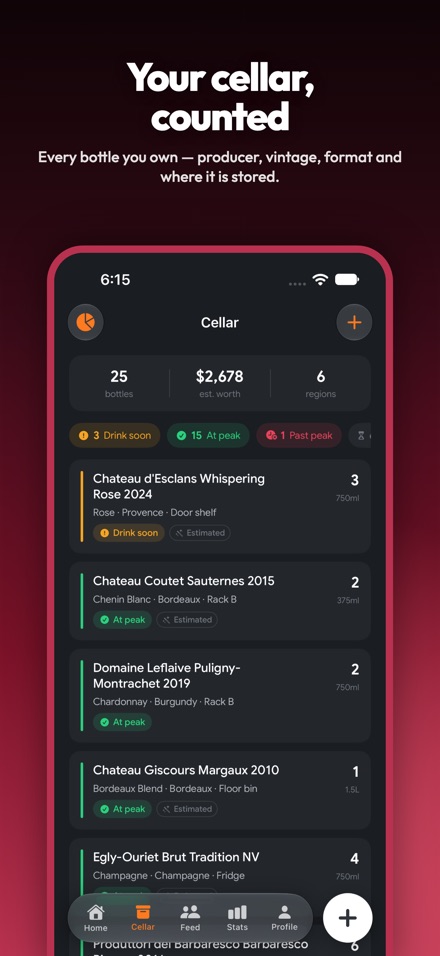
Producer, wine name, vintage, varietal, region, storage spot, how many you have and what format they are in — from a 187 ml piccolo up to a 6 litre imperial.
A cellar is only useful if you remember what is in it. Sip Vino lists every bottle you own in the order it needs drinking, keeps the note you wrote the last time you opened one, and tells you what the whole lot is worth.
iOS 17+ · Cellar data stays on your device
Not alphabetical. Not by vintage. By what you should be opening next.
Built for people with a wine rack and a bad memory, not for sommeliers with a spreadsheet.
Producer, wine name, vintage, varietal, region, storage spot, how many you have and what format they are in — from a 187 ml piccolo up to a 6 litre imperial.
The list leads with what needs drinking: drink soon, then at peak, then past peak, then too young. How the window is worked out is explained below.
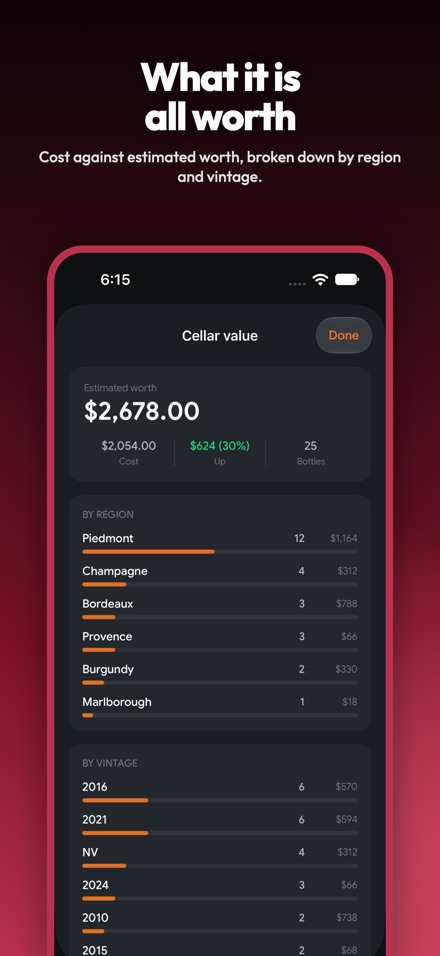
What you paid per bottle, what you reckon it is worth now, and the difference across the whole cellar — broken down by region and by vintage.
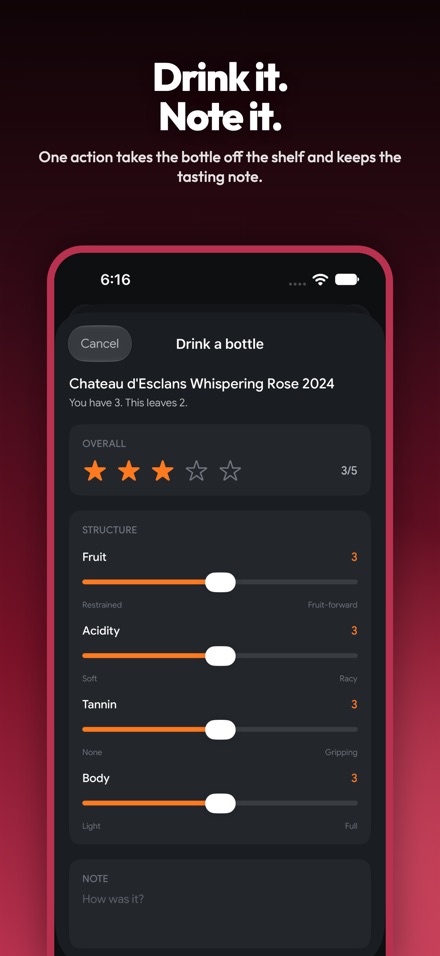
Tap "Drink one" and the bottle comes off the shelf and the tasting note gets written in the same sheet. Rate it one to five and set fruit, acidity, tannin and body on four sliders.
Notes keep the producer, name, vintage and varietal on them, so when the last bottle is gone the record of what it tasted like stays behind for the next time you see it on a list.
Bottles, prices and tasting notes are stored on the device and are not uploaded to us. That also means there is no cellar backup or sync yet — the detail is below.
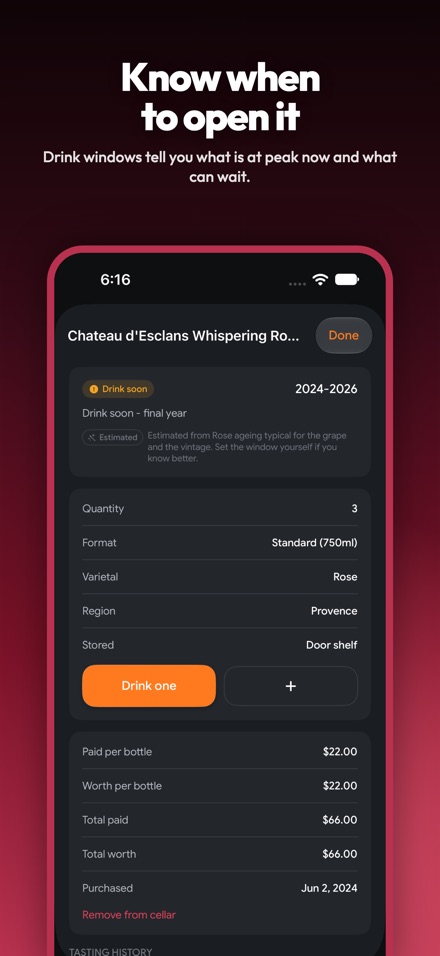
And the app always tells you which one you are looking at.
If the producer gave a window, or you simply know, type the drink-from and drink-by years when you add the bottle. Sip Vino takes your word for it and never overrides you.
From the varietal's usual ageing band, the vintage, and the bottle format — big formats age slower. The result is labelled Estimated on screen, with a sentence saying why.
Every bottle lands in one of four buckets — too young, at peak, drink soon, past peak — and the cellar list puts the urgent ones at the top where you will see them.
Sip Vino is built on the same foundation as Sip, so the drink tracking comes with it — the cellar is what is new.
| Screen | What is on it |
|---|---|
| Cellar | The bottles you own, drink windows, cellar value, tasting notes |
| Home | Today's BAC estimate and calorie ring, recovery time, the drinks you logged |
| Add | Photo scan, upload or type it — the same AI drink recognition Sip uses |
| Stats | BAC trends, calories and macros, dry days, hangover history, CSV export |
| Feed | An optional public feed of drinks people chose to share, and beer ratings |
| Profile | Your account, units, appearance, verification, and account deletion |
The AI photo scan reads drinks in general — it is not a wine-label reader, and the Cellar screen does not use it. Bottles are added by typing.
Being local cuts both ways: because the cellar never reaches a server, there is no cellar backup, no sync between devices, and no way for us to restore it if you lose the phone. It is included in your normal encrypted iPhone backups, and that is the only copy. The full detail — including every third party involved in the tracking half — is in the Sip Vino privacy policy, next to the Sip Vino terms of use.
There is no App Store listing yet. The app is built and in internal testing. Email [email protected] with the subject "Sip Vino launch" and we will write to you once, when it is live.
No. Bottles are added by typing, with the region and storage location offering back the values you have used before. The camera scanner in the app identifies drinks generally — it is not trained on wine labels and the cellar does not use it.
No, and it says so on the valuation screen. There is no market-price feed. Bottles you have not revalued yourself are counted at what you paid for them, so "estimated worth" means your estimate, not an auction result.
Not today. The cellar lives in local storage on one phone. It travels in an encrypted iPhone backup, but there is no account-based sync or server-side copy of it, and we cannot restore it for you.
No. Sip Vino requests no HealthKit permissions and reads nothing from the Health app. If you want hydration in Health, that is Sip Water.
Yes. Sip and Sip Vino sign in against the same Delta Metrics account, so one profile covers both and deleting your account covers both. Note that account deletion removes the server-side data — your local cellar is removed by deleting the app.
Not announced. The app has subscription tiers built in for the tracking features, but nothing in the cellar is behind them today, and we are not quoting launch pricing before there is a listing to put it on.
Twenty-three, from Cabernet Sauvignon and Nebbiolo through Champagne, Rosé, Port and Sherry, plus an "other" option. Each one carries its own ageing band, which is what the drink-window estimate is built on.